
A House With No Front Door: How I Deployed AI.KOTA to a Server of My Own
Moving AI.KOTA from my laptop to a borrowed server: Cloudflare tunnels, secret keys, Docker, and a way back when a release goes wrong.
The app was done, but it only lived on my laptop
At the end of October 2026, the new version of AI.KOTA was finally ready. It helps city governments manage residents’ reports: people can report damaged roads or piles of rubbish, city departments can respond, and the mayor can see what is happening across the city on one screen, alongside an AI assistant named Abram.
The problem was that it only ran on my laptop. Its address was localhost:3000, which, with my local setup, meant opening it on that same machine. Close the lid and the app went to sleep too. Anyone who wanted a look had to sit next to me.
The next job sounded simple: move the app to a computer that stays on and can be reached over the internet. In tech, that is called deployment. Simple enough in theory, but the road had plenty of turns. This is the story of those detours and the decisions behind them.
If you are not a technical person, don't worry. I will use the same analogy throughout: opening a shop inside someone else's house.
The analogy: a shop inside someone else's house
Picture the app as a shop. Until now the shop sat in my bedroom, so I was the only customer. Now I wanted to move it somewhere that stayed open around the clock and welcomed visitors from anywhere.
Luckily, a lecturer who owns several "houses" (servers) was willing to lend me a room. That room was a VM, short for virtual machine: a larger computer divided into several smaller virtual computers. I was given one of them.
Then came a problem. The house sits on an internal network and has no street address that outsiders can find. The usual fix is to build a front door, put up a house number and open the gate. But an open front door also means anyone can knock, including thieves.
So I chose a different way: a house with no front door.
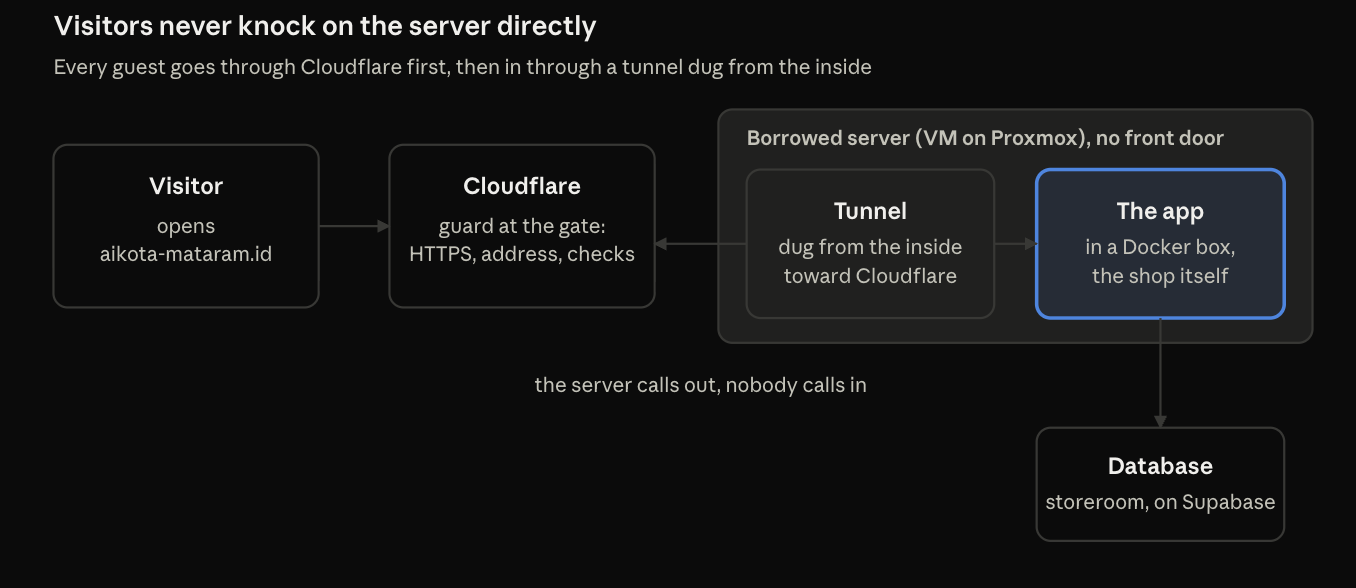
From inside the room, I dug a tunnel to a security guard named Cloudflare. Visitors arrive at Cloudflare first, then reach the app through that tunnel. Because the connection starts from inside the server, the app does not need an inbound port exposed to the internet.
First detour: the guard wanted a credit card
My first plan used a Cloudflare feature called Zero Trust. The plan I tried was free, but signing up still required a credit or debit card. I didn't have one. My PayPal was linked to a bank account, not a card, so it was rejected too.
I was stuck for a moment. Then I discovered that I could set up the tunnel itself without completing that signup. Cloudflare has a small tool called cloudflared that runs from a laptop. With one browser login, I could:
- Create a new tunnel under my domain.
- Get one tunnel key file, a kind of permit for my room.
- Point the address
aikota-mataram.idat that tunnel.
All of that worked without a card. What still needed one in my setup was an extra lock on the back door: protection for SSH, the connection I use to work on the server. Later a teammate lent me their card, so the back door got a guard too: only my email address was allowed through, with a verification code sent to that address at login.
The lesson: when one road is blocked, there is often another road to the same place. What matters is knowing which part really needs the requirement, and which part doesn't.
Second detour: a server screen that won't paste
The tunnel was created on my laptop. Now its key file had to get inside the server. The trouble was that my only way in at that point was a console screen in the browser, much like a monitor plugged straight into the machine. And that console would not paste.
The tunnel key file is hundreds of random characters. Typing it by hand is asking for trouble: one wrong character, the tunnel fails, and I would never know which character was wrong.
My workaround was like a courier carrying a locked box.
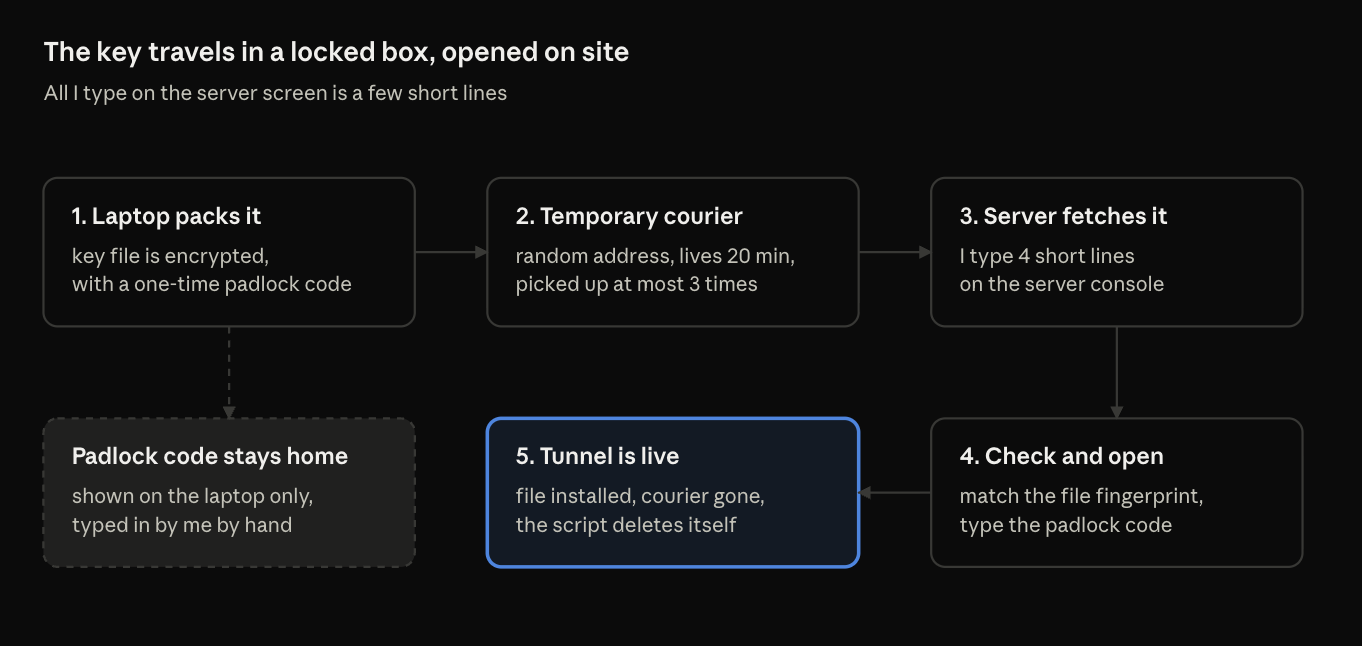
If someone intercepts the box on the way, they can't read what is inside, because the padlock code never travels with it. The courier was temporary too: it stayed available for only 20 minutes and allowed at most three downloads. On the console I only had to type four short lines: fetch the package, check its fingerprint, read it for a moment, then run it. Before running any script from the internet, always read it first. That small habit saves a lot of servers.
Secret keys: never in a chat
The app has several secret keys. One opens the database with full access, one talks to the AI service, and another helps match residents' phone numbers without storing them as plain text. That last one is the most sensitive: if it is lost, stored phone numbers can no longer be matched, and the key can't simply be swapped out.
Throughout this work I had help from an AI assistant for writing code and planning steps. But I held one rule from day one: the assistant never sees a key's value. The assistant prepares the commands, I enter the values myself on the server, and the screen only reports "filled" or "EMPTY".
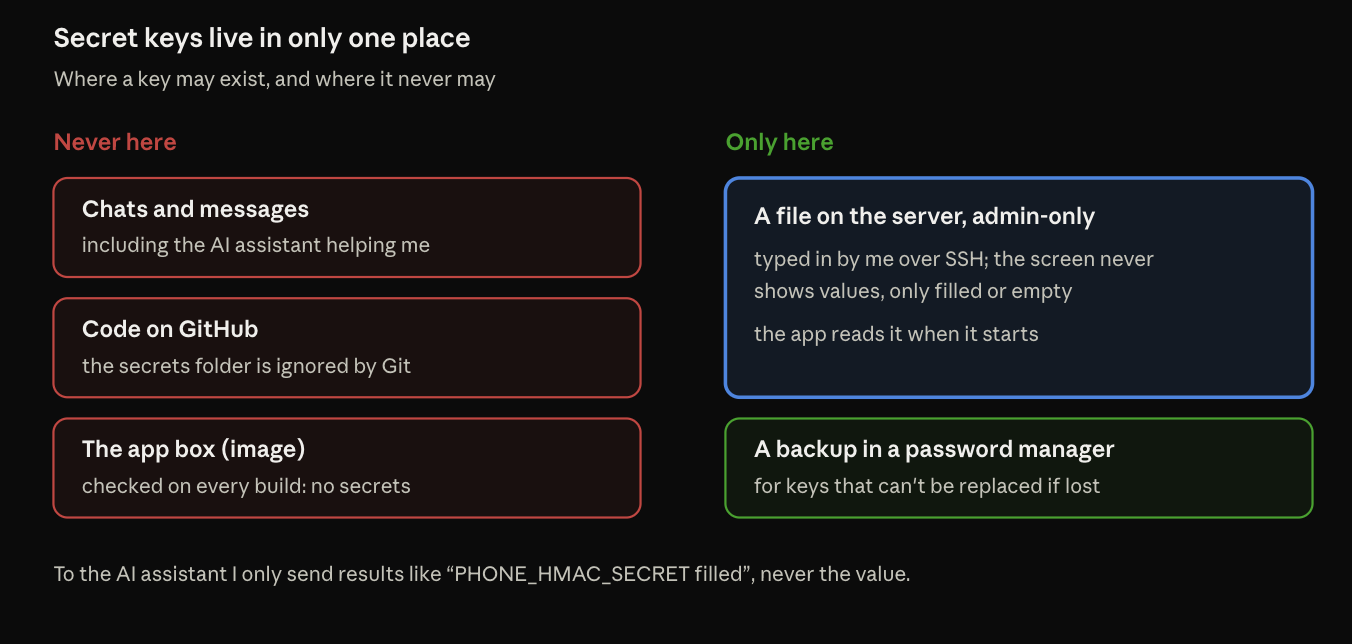
This rule sounds like a hassle, but once a key leaks somewhere it should not be—a chat, a screenshot, or GitHub—it has to be revoked and replaced. For a key tied to stored data, that can also mean a difficult migration. Being careful at the start is cheaper.
Docker: a shop in a box, with a way back
The room I borrowed isn't empty. Other people's things live there too. To keep my shop from mixing with them, I put the app inside a box called Docker. The box holds what the app needs and helps keep its environment separate from everything else on the server.
I gave the box limits too: a memory cap, no admin privileges, and an application port reachable only from the server itself. Those boundaries help limit the damage if something goes wrong, though a container is not a guarantee that nothing can affect the host.
My favourite part was switching between versions:
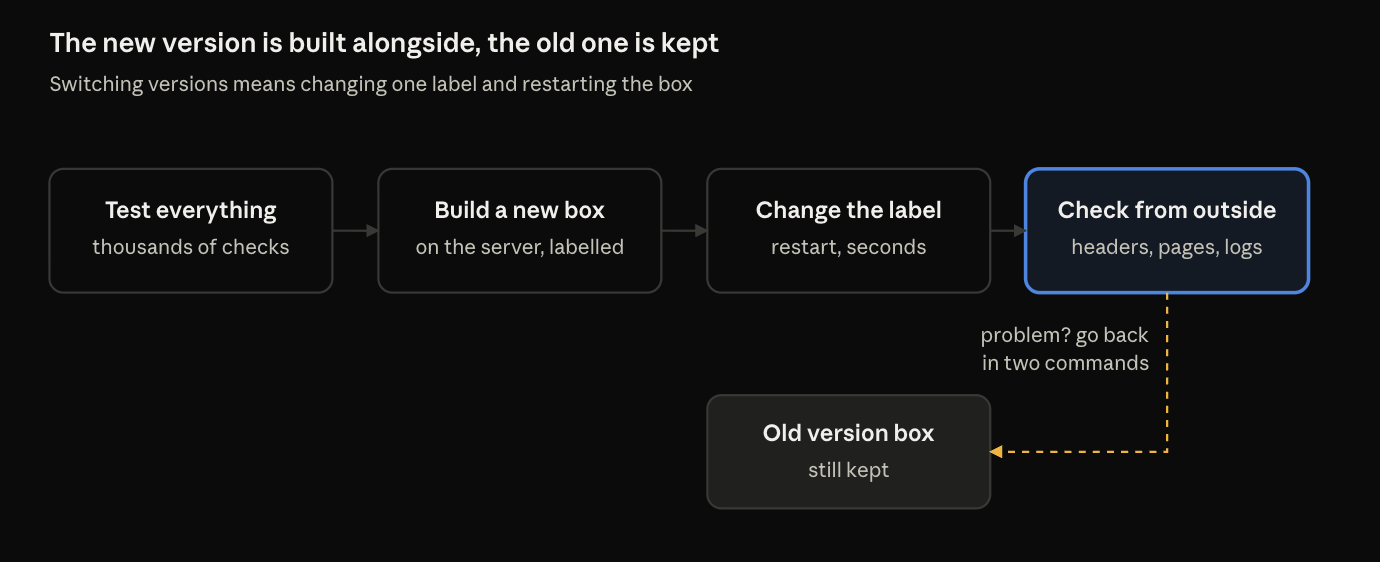
The new box is built next to the old one, never on top of it. To switch, I change one label ("use this version") and restart. The app is down for a few seconds at most. If something turns out wrong, I just point the label back at the old version. No panic, no rebuilding from scratch.
An unexpected enemy: a laptop that falls asleep
Before any version goes live, the app has to pass a set of automated tests. Thousands of checks: pages strangers must not open, data that must not leak, the full report flow from resident to department. One full round takes almost an hour, and it runs on my laptop.
A few times the tests failed for no reason that made sense. The cause turned out to be simple: the laptop fell asleep. Lid closed, battery running low, the Mac goes into power saving, the connection drops, the tests fail. Once they also failed because I logged into a test account myself in the middle of a run, so the tests and I were "fighting" over the same account.
That led to a few small habits:
- Tests only run while the laptop is charging, the lid is open and the WiFi is stable (not a phone hotspot).
- At the start of a run, an automatic warning appears if the laptop is on battery.
- While tests run, I don't touch the app or the test accounts.
- When a test fails, find out why first. Don't just rerun it and hope.
After a new version goes live, there is one more stage: checking from the outside, as if I were an ordinary visitor. Are the pages that should be locked really locked? Are the expected browser security headers present? Do pages not yet open to residents actually deny access? Is password login to the server switched off, so only a special key gets in? Only after every box is ticked is that version considered done.
What I took home
AI.KOTA now lives at aikota-mataram.id, in a borrowed room with no front door, guarded at the gate, with a way back home always ready in case a version misbehaves.
These are the five lessons I took from the journey:
- Don't open a door you don't need. An outbound tunnel let me avoid exposing an inbound application port.
- When the road is blocked, find out which part really needs the requirement. Usually it is one small part.
- Keep secret values where they belong. Assistants, chats and GitHub only need to know "filled" or "empty", not the values themselves.
- Always keep a way back. A version switch you can undo in two commands makes every release calm.
- A failing test is information, not a nuisance. Sometimes the cause is the code, sometimes it is a sleepy laptop.
Deploying turned out to be more than "uploading an app to the internet". It is closer to moving a shop: there are keys, guards, a storeroom, and a plan for when something goes wrong. And like a real move, what makes it go smoothly is the preparation: small decisions and checks, worked through one by one.